

Key Takeaways:
- Passkeys aren’t a “future roadmap” topic anymore and finally killing passwords.
- Most people: use synced passkeys for easy, phishing‑resistant sign‑ins across devices.
- Admins and high‑risk roles: require device‑bound, hardware‑backed passkeys for top assurance.
- Use it with WebAuthn attestation at registration to define and enforce risk-based policy.
The last few years have been encouraging to watch organizations wrestle with the “security vs. friction” trade-off, and finally seeing passkeys move from theoretical roadmap topics to practical rollouts. Passwords had a long run and attackers loved them. Passkeys flipped the script replacing these knowledge-based secrets with unique, origin-bound public-private key pairs, so sites get the public key and your private key stays secure with you. No transmitted secrets, no reusable phish bait.
"Not all passkeys are created equal. Are we focusing on usability, or maximum assurance?"
However, once you start planning a rollout for the newer, shinier login method, you come across a messy reality of teams that have underestimated the distribution challenges, or oversimplified the device-lost panic and a clear recovery procedure or just failed to adequately communicate the “new” experience, losing their users' trust – and they retreat right back to the dangerous comfort of weak phishable passwords. Here’s the important question: Before we plan an organizational rollout, we need to recognize who is the target user. Not all passkeys are created equal … Are we focusing on usability, or maximum assurance?
It’s a choice between availability and integrity – between the seamless experience required for mass consumer adoption and the rigorous isolation demanded for high-assurance security for high-risk scenarios. While synced passkeys leverage cloud-based orchestration to solve the "availability" problem ensuring users never lose access to their digital identities, they carry the risk of secret exportability. Conversely, device-bound passkeys prioritize "integrity" and non-exportability by anchoring secrets in specialized hardware (TPMs or Secure Enclaves) but carry the risk of user “lockouts” if they lose their key.
Introduction to Fundamentals
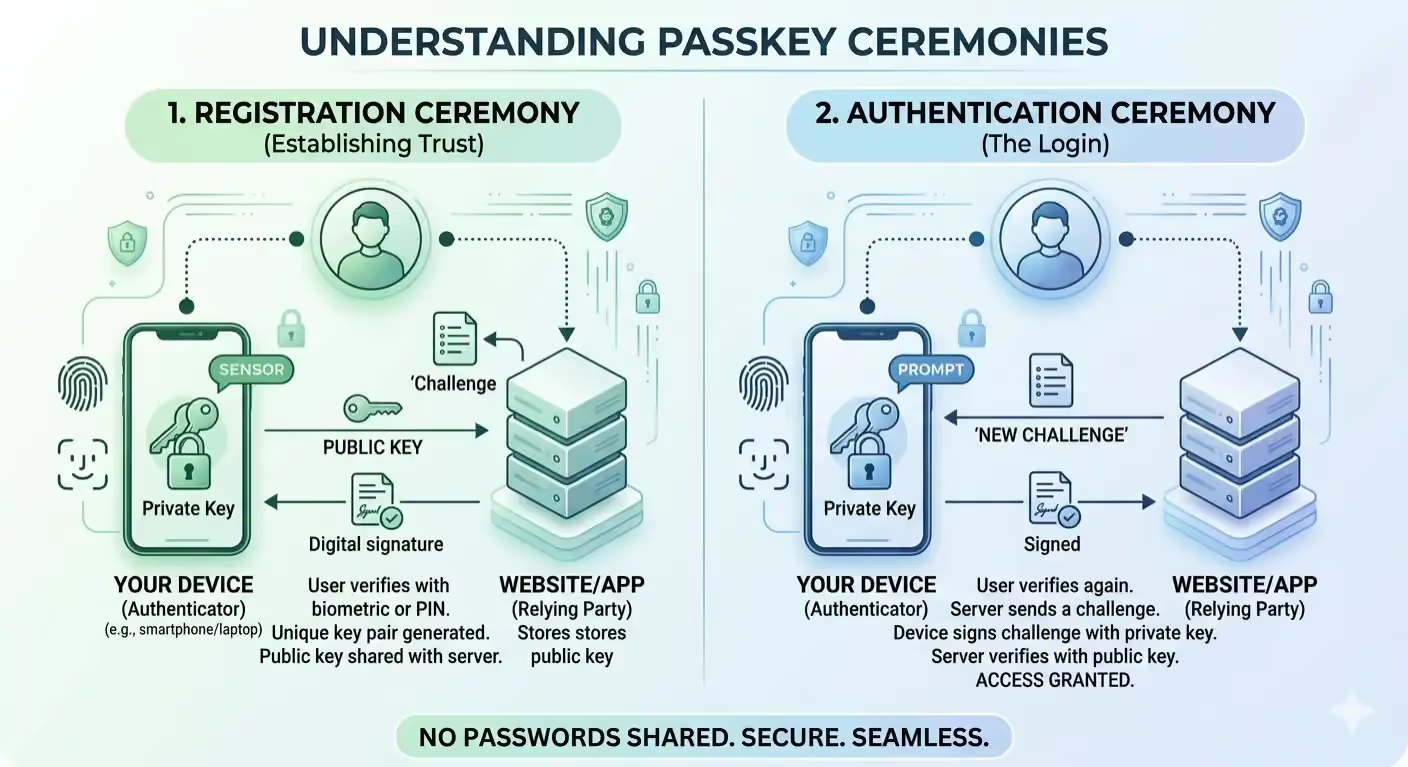
At their core, passkeys replace passwords with asymmetric cryptography and are built on the FIDO2 and WebAuthn standards, relying on two primary "ceremonies".
Registration
- The relying party initiates registration.
- The device generates a new public-private key pair (ideally inside secure hardware).
- The public key is sent to the server.
- The private key never leaves the device.
Authentication
- The server sends a cryptographic challenge.
- The user unlocks the private key locally (biometric or PIN).
- The private key signs the challenge.
- The server verifies it with the stored public key.
Synced Passkeys
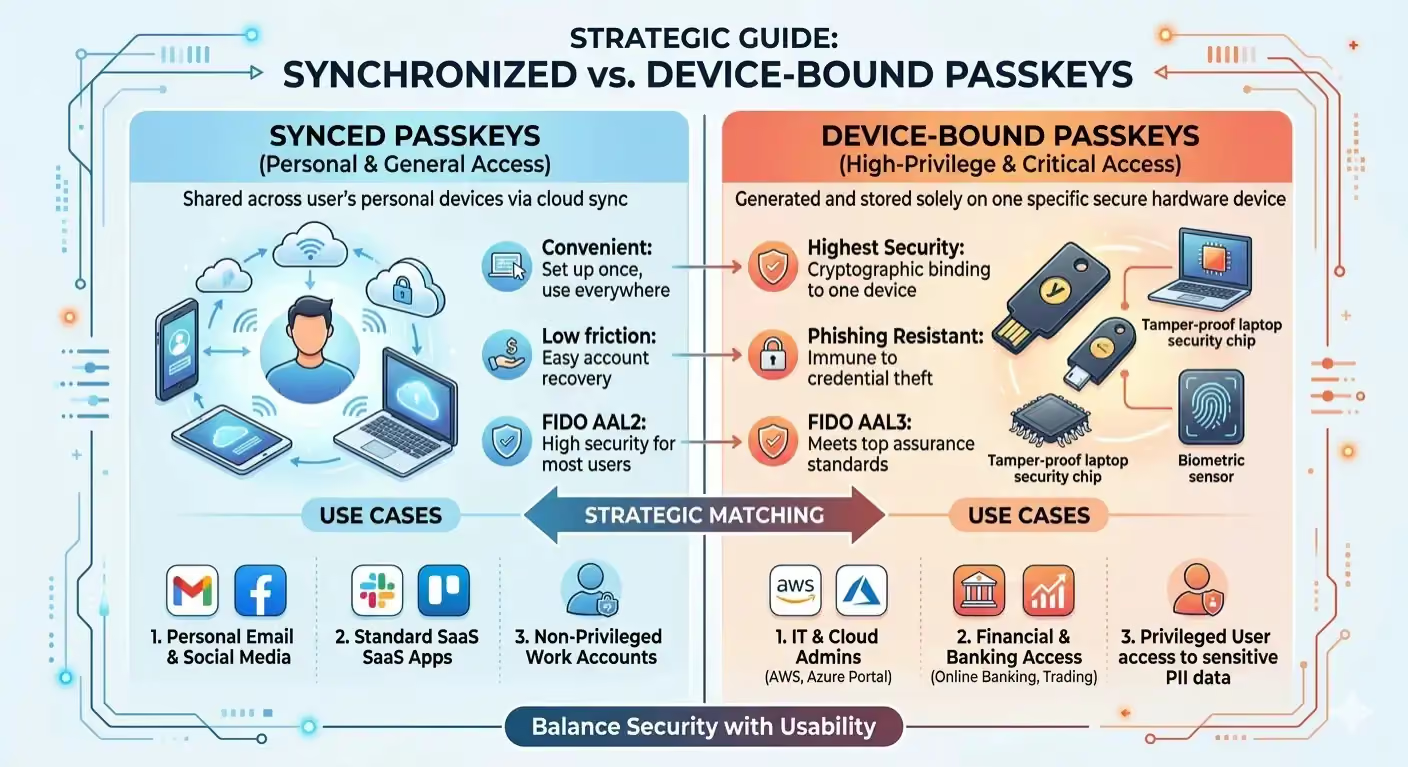
Synced passkeys (or multi-device passkeys) bridge the gap between strong security and practical daily use by enabling credentials to follow you across all your devices, prioritizing availability and recovery through seamless cross-platform access. In this model, the private key is end-to-end encrypted and uploaded to a cloud vault and uses a sync fabric provided by the platform ecosystem (like Apple, or Google) to replicate it securely.
Strengths
- End-to-End Encryption (E2EE): Before leaving your device, the passkey is encrypted with a user linked key (often derived from your device passcode or biometrics). The provider (e.g., iCloud Keychain or Google Password Manager) hosts the encrypted data.
- Expansion of Trust: When you sign into a new device with your cloud account, the new device is verified by an already-trusted device, often via a QR code or Bluetooth handshake, to join the trusted circle and receive the encrypted keys.
- Seamless Recovery: If you lose a device, you can regain access by authenticating to your cloud account on a new one. This eliminates the permanent lockout scenarios inherent to device-bound passkeys.
Security Implications
Since the private key is transmitted over a network, even with end-to-end encryption, it does not meet the strict definitions of "non-exportable" hardware isolation. While synced passkeys are a transformational upgrade over passwords, they shift the attack surface from the individual website to your cloud provider account.
Summary
"The trap most organizations fall into is treating this as a binary choice."
Device-Bound Passkeys
Device-bound (hardware-backed) passkeys are the "gold standard" for high-stakes security. Unlike synced passkeys, these credentials are physically tethered to a specific piece of hardware, prioritizing integrity over convenience. The private key is generated and stored inside a specialized security chip such as a TPM (Trusted Platform Module) on a laptop, a Secure Enclave on a smartphone, or a dedicated FIPS 140-compliant USB security key like a YubiKey.
Strengths
- Hardware Isolation: The private key material never touches the main operating system or memory. Even if a device is infected with advanced malware or a rootkit, the attacker cannot copy the passkey file because it doesn't exist as a movable file.
- Physical Presence (User Intent): These keys often require a physical action to trigger such as a tap on a USB key or a biometric scan to prove that a human is physically present at the machine, preventing silent remote authentication by attackers.
- Attestation: During registration, the device can send an attestation statement. This is a cryptographic proof that allows the server to verify the type of hardware being used (e.g., "This key was definitely generated inside a FIPS-certified Titan chip").
Operational Challenges
The primary risk is "permanent lockout". If a user misplaces or loses their physical key and has no secondary registered device, they lose access. This necessitates complex administrative override procedures for enterprises.
NIST Framework Alignment
NIST uses Authenticator Assurance Levels (AALs) to categorize strength of authentication factors.
- AAL1 – Some confidence
- AAL2 – Strong, phishing-resistant
- AAL3 – Very high confidence, hardware-backed, non-exportable
Under the NIST 800-63-4 framework, synced passkeys meet AAL2 standards because they are resistant to phishing and replay attacks. While they are a major security leap over legacy MFA factors like SMS or OTP, they are disqualified from the higher AAL3 standard. This is because AAL3 requires "non-exportable" hardware, and synced passkeys are designed to be cloned across the sync fabric. Furthermore, the cloud vault itself (like iCloud Keychain or Google Password Manager) must be secured with AAL2-compliant authentication.
Device-Bound Passkeys are required for AAL3. They must use a hardware-based authenticator where the private key is non-exportable. It also mandates an explicit "Authentication Intent" (e.g., a physical touch on a hardware) to prevent silent authentication by malware.
Comparative Threat Modeling
Enterprise Implementation & Strategy
For an organization to successfully deploy passkeys at scale, they must adopt a hybrid tiered access model based on user populations and resources, through risk classification, that balances security with operational efficiency:
- Standard Access: Use synced passkeys for most users and non-sensitive apps. This eliminates the risk of account lockout due to device loss and significantly reduces IT support costs while maintaining high security.
- Privileged Access (Critical Roles): Mandate device-bound passkeys for users with "keys to the kingdom" including IT administrators, financial controllers, and those accessing production infrastructure or sensitive PII.
To enforce this policy automatically, use WebAuthn Attestation during the registration process to programmatically distinguish between synced and hardware-bound keys at the protocol level; ensuring high-risk accounts always meet the required security standard.
Conclusion
The transition to passkeys represents the most significant security upgrade in a decade. The trap most organizations fall into is treating this as a binary choice. In reality, a successful rollout is a risk-based tiered defense strategy – synced passkeys being the flexible catalyst for mass adoption enabling users to finally abandon passwords confidently, but device-bound passkeys are the gold standard needed for critical access and high-risk targets like system administrators and executives, ensuring that critical access can never be intercepted across a network or stolen from a cloud vault.